Dark AleX has released a new DC for our unbricking pleasure.
Some of the new features are:
- New GUI
- Installs CFW 4.01 M33-2
- Boots 4.01 from the memory stick without installing (for testing purposes)
Thanks DAX. Well done.

Dark AleX has released a new DC for our unbricking pleasure.
Some of the new features are:
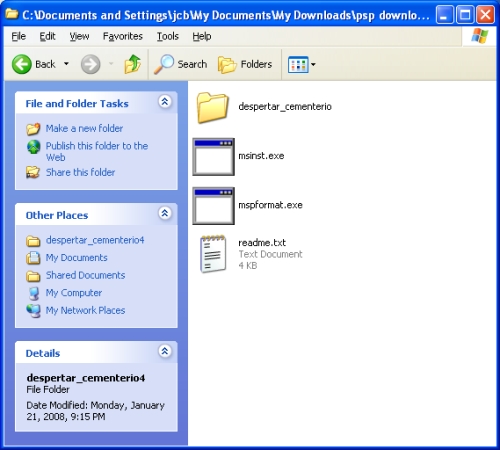
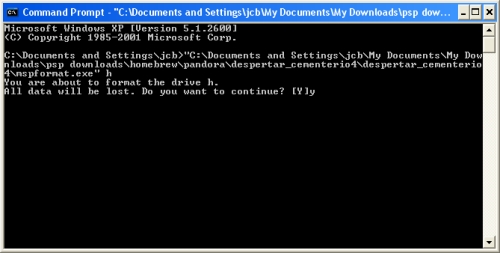
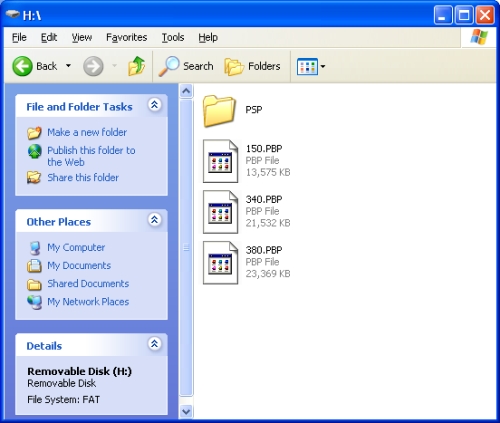
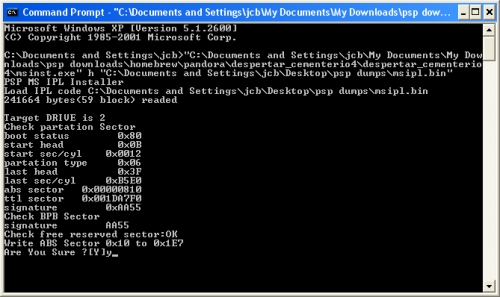
I have finally caught up with the masses. I now have a DCv4 memory stick and Pandora battery. I know that I am way behind in creating these but I didn't have a spare battery to use. Anyway, here is a little guide on how I created the memory stick and battery:
Creating Pandora Battery:
I used the BatTool v0.5 for 3.XX to create my Pandora Battery. It is easy to use, reversible, and allows you to dump the eeprom.

For many of you this won't be big news. It will probably be old news in fact but I just received my new 2200 mah PSP battery and thought that people who are new to the homebrew scene may find it interesting. Here are the unboxing pics (click to enlarge all images in this post):


This will become my primary battery and my original (1800 mah) battery will become my Pandora battery along with my 1 gig memory stick. I realize that it am really late to the Pandora party but I wanted to explain a little about these batteries here and I will be making another post in the near future about how I made my Pandora battery/memory stick. Here is my original battery:

There is a lot of confusion about exactly which batteries can be used for Pandora. Here is an ongoing list/thread about which brands and models are Pandora compatible. Post #66 from the thread talks about this exact battery, and says that it works for Pandora.
As you can see in the pic above, I was able to find what I believe is a genuine Sony PSP-280 battery made in China. If this is a fake then the "pirates" creating these are very talented because I can not find anything that makes me believe it is not a genuine Sony product. I bought it from Amazon here
I hope this helps any of you who are considering buying a new battery and need it to be Pandora compatible. This battery is more expensive than many others but I would rather spend the money on the battery I know I want than gamble on whether the cheap one can be Pandora-ized.
Dark AleX has released the much anticipated TimeMachine v0.1. This allows PSP slims to run 1.5 homebrew and also lets slim and phat users load older versions of DAX's cfw's directly off the memory stick. This sounds like it will be very useful for quick and easy version changes to your cfw, as long as you have a Pandora battery. Here is the readme that comes with TimeMachine:
TimeMachine 0.1
---------------
The Timemachine is a program to load previous firmwares and custom firmwares from memory stick using pandora. Like devhook, but working throgh pandora and custom ipl's, it would work even if the flash and nand ipl of the machine is destroyed.
The timemachine is useful to run software that is not supported anymore, and also as a way of booting psp's even if the internal firmware is destroyed. It can also be useful for developers to test their homebrew in different firmwares.
Currently the timemachine can install the following firmwares:
- Original 1.50 (can only be loaded on the phat)
- 1.50 with some 3.40 hw modules. Can be loaded on both, phat and slim.
- 3.40 OE (can only be loaded on phat)
- 3.60 M33 (can only be loaded on slim)
Rest of cfw will be added in the future.
Requirements of time machine:
- The timemachine itself doesn't require any firmware, only a pandora battery.
Timemachine nand boot in slim, requires, however, 3.90 M33-2 or greater.
- The timemachine installer requires 2.71 SE or higher.
Instructions: Copy the TIMEMACHINE folder to /PSP/GAME and run.
All firmwares can be installed on whatever PSP (slim or phat), but they can only be used in the psp indicated in the option.
Explanations of options:
- Option 1: Install iplloader. This will install the timemachine iplloader in the memory stick.
The iplloader is so small, that doesn't require any mspformat to have been done before.
This step is necessary to run anything else.
The iplloader of the timemachine is a multiipl loader that can load multiple ipl's accorrding to key configurations found in the file /TM/config.txt (this file will be created by the timemachine installer).
The default configuration is to load the ipl's with the following keys:
- 1.50: cross
- 1.50+3.40hw: circle.
- 3.40 OE: triangle.
- 3.60 M33: square
- Pandora/DC1-4 ipl (converted to TM format): digital up
- Anything else: will boot the firmware installed on flash.
(Note: as said before, in the slim, only nand firmwares with 3.90 M33-2 or higher can boot. Neither prvious CFW nor whatever original firmware can boot from nand when booted from a Pandora battery due to a Sony protection that has to be bypassed by the own nand ipl code).
You can modify this configuration following the instructions of the file config_readme.txt that will be written on the /TM folder after installing the iplloadder.
- Option 2: Convert pandora IPL into TimeMachine format.
Because the ipl used in pandora and DC1-DC4 (they are all same) is not compatible with the timemachine ipl format and user may want to load pandora/DC1-DC4 with the TM iplloader, this option is for that.
Requirements: the ipl of pandora/DC1-DC4 in the root of the memory stick, named "msipl.bin".
This file is written by Pandora and DC1-DC4 installers.
After convertion, the converted ipl will be in /TM/pandora.bin.
- Option 3: Install 1.50.
It will install 1.50 which can only be run on the psp phat (for a 1.50 that can be installed on the slim go to the next section).
Requirements: the eboot.pbp of 1.50 in the root as 150.PBP
- Option 4: Install 1.50 with 3.40 HW modules. (PSP PHAT or SLIM).
This will install a mix of 1.50 software modules with some 3.40 hardware modules, so it can work on the psp slim. It will usually run most 1.5 homebrew.
Requirements: 1.50 and 3.40 Sony eboot.pbp in the root renamed as 150.PBP and 340.PBP, and the 360.PSAR on the root too (to know what the 360.PSAR is, read below, in the 3.60 M33 installation section).
From 1.50 it will be extracted most modules, usually the software related ones.
From 3.40, it will be extracted a few modules, usually hardware modules.
From 3.60, it will only be extracted the wlan bios of the slim chip.
Known problems or considerations of the 1.50+3.40hw:
- The media doesn't work fine in the XMB (music, videos, etc).
Yeah, this is known, anyways the main purpose of this firmware is to run homebrew, as for XMB usage is better to use a more modern one.
- The "videocodec bug", aka crappy pmf play, only happening in the slim.
For some hw incompatibilty that coudln't been resolved yet, pmf videos, including the gameboot, will play crappily in the slim.
This will happen also in 1.5 games you try to run, videos will play crappily.
Because PMPAVC videos also use the videocodec API, they will play crappily too.
Normal pmp (xvid) (used on pimpstreamer too) will play fine however as they are decoded by cpu.
- The exit with home with "odd colors" bug.
When exiting with home from a homebrew or game, you may see random colors at the end of the framebuffer.
Nothing important, it even gives it an accidental stylistic look
- The PC os may detect the PSP slim as a new device.
This is normal, psp slim has a different product id (pid), but 1.5 usb driver uses only the old phat pid. Nothing important, the usb will work fine in the slim.
- Wlan. The wlan seems to be working, it has been tested using the network update download, and pimpstreamer 201 for 1.50.
However two things are recommended:
* Turn off the wlan power save.
* Use manual IP and DNS configuration (otherwise you may have DNS problems).
If you don't know the manual configuration for your router, just do an automatic connection in a higher firmware, and write somewhere the data that appear in the test page at the end, and use that info to fill the manual configuration in 1.50+3.40 hw.
* As in normal 1.50, there is no WPA support.
- Homebrew that uses some patching code over some of the module that are from 3.40, will not work and will probably crash. This is obvious, they were coded to patch 1.50 modules
- Option 5: Install 3.40 OE.
It will install original 3.40 OE which can only be booted on the phat.
Requirements: 1.50 and 3.40 Sony eboot.pbp on the root as 150.PBP and 340.PBP
- Option 6: Install 3.60 M33.
It will install original 3.60 M33, that can only be run on slim.
Requirements: 360.PSAR on the root.
Because there is no 3.60 eboot on the net as the slim was shipped directly with 3.60, the 360.PSAR is a file that has to be created on a psp running 3.60 M33.
To dump 3.60: run the program 360DUMPER that is in this release in a psp running 3.60 M33.
The result 360.PSAR is a file that uses the decrypted psar format (what a sce psar would look without encryption), that was already used in 3.51/3.52 M33, and it will have following size and md5 (checked anyways by the tm installer):
Size: 18189502 bytes.
MD5: EAA13343C70D9B0337C75B295 474C69A
-------------
Differences between running a firmware in the TimeMachine and a firmware in the flash.
Usually the time machine will run the firmware or cfw unmodified, including its original not critical bugs.
There are some exceptions:
- In 3.40 OE a critical bug regarding the configuration file descriptor not closed is fixed by the timemachine core patching the OE core in ram
- The TA-086 brightness is fixed for everything that has a 1.50 kernel
- The 4th level of brightness (i cannot live without it) is enabled for whatever thing, either if it is done nativelly (3.40 OE, 3.60 M33) or by the timemachine code (1.50, 1.50+3.40hw).
- The signcheck is patched and the firmware is written unsignchecked, so it can be shared between different psp's.
- 8 GB and greater memory sticks are enabled everywhere.
- 1.50 an 1.50+3.40hw can run not kxploited pbp's too.
- Flash USB doesn't work. This is normal, the flash usb uses the lflash block device, and in the timemachine that device is unnecesary and its implementation is a dummy one. Just use the normal memory stick usb, as the firmware is there
Other considerations:
- Usually the firmware running the timemachine should have more free kernel memory than the normal one, because the lfatfs module is replaced by the timemachine core which should be using less memory.
- IF you see somewhere (probably in the browser) an error 0x80010018, this is because of too many files opened in the memory stick (as normal memory stick driver is shared with the pseudo flash one).
The timemachine core tries, however, to minimize at maximum that this error happens.
- The Time Machine works faster if you install all firmwares you are gonna use after having formatted the memory stick, and then put everything else.
- When booting with a pandora battery in the nand firmware, remember that unless you change the battery, you will need the same memory stick to recover from sleep mode!
- Be sure to distinguish between TM bugs and OE/M33 bugs. For example, in 3.60 M33, if your iso running in March33 no-umd mode hangs at exit, that was a bug of 3.60 M33, not of the timemachine!
Little FAQ:
- What is loaded from nand and what from memory stick?
Only idstorage is read from nand, everything else, ipl and flash files are loaded from memory stick.
Not even a single instruction of Sony regarding the reading of flash files and partitions is executed.
In the future, the load of idstorage from memory stick is planned as an option.
- Why don't you make a 1.50 addon for 3.90 M33 for the slim if it can run now on the slim?
Currently, it is only possible to run this 1.50+3.40hw in a TOTALLY fresh booted machine by the user.
Not even a psp cold-reseted by software can run 1.50+3.40hw after having been in 3.xx, due to some problems related with slim hardware.
There are other implementation problems, but that one is the more critical.


