
Dark AleX and M33 have updated the 3.90 custom firmware to be more compatible with the NO-UMD driver. Also, version 5 of Despertar del Cementerio has been released. It now installs 3.90 M33 and is compatible with TimeMachine. Thanks DAX and M33 for all your hard work.
Sunday, March 30, 2008
Saturday, March 29, 2008
PSP Maps v0.6 Review

Here is another entry into the NeoFlash Competition: PSP Maps v0.6 by royale. Think of PSP Maps as a hybrid of Yahoo maps and Google maps that you can use on your PSP. You will start off by connecting to your preferred wireless access point. Then enter an address and PSP Maps will find it and zoom in or just use the analog or directional pad to move around and shoulder buttons to zoom in and out. The complete list of controls are:
- Digital pad: move the map.
- Analog pad: move the map smoothly.
- R button: zoom in.
- L button: zoom out.
- X button: next view type.
- [] button: previous view type.
- /\ button: enter an address.
- O button: show/hide crosshairs.
- Start: menu.
There are 8 "view types" available that I have found. They are:
- Google Maps/Maps
- Google Maps/Satellite
- Google Maps/Terrain
- Virtual Earth/Road
- Virtual Earth/Aerial
- Virtual Earth/Hybrid
- Yahoo Maps/Map
- Yahoo Maps/Satellite
PSP Maps has the "Wow" factor. When you start using this app it will blow you away. The map images are stunning and navigation is easy and intuitive. With almost every new move you make to the map the app has to load new images. This is only a slight annoyance because the load times are very short. I was able to move from Columbus, Ohio to Antarctica to Hawaii in a very short amount of time. A nice feature is the adjustable cache, allowing for offline use. I tried it out and found that it works surprisingly well. The size of the maps saved would be a very useful alternative to having a GPS unit in your car, assuming you aren't planning any cross-country road trips. If I were judging the NeoFlash contest (which I'm not), this would be my hands down favorite app. PSP Maps should be on your memory stick. I am adding this to my Best Homebrew list. Amazing work, royale.


Tuesday, March 25, 2008
Bumper Harvest v1.1 Review

Bumper Harvest is Kagato's entry into the NeoFlash Spring Coding Competition. Think of Bumper Harvest as a game of bumper pool but your "cue ball" is always shot from the same starting point. The primary object of the game is to bounce the ball off of the red bumpers to remove them from the playing field and advance to the next level. Bounce the ball off of the blue bumpers to increase your score; green bumpers to gain targeting guides; and yellow bumpers to gain extra balls (with enough points). There are also larger "red star" active bumpers and grey fixed bumpers which can help or hinder your progress. After you have gained the targeting guides, pressing the right shoulder button will give you a line along which the ball will travel. The ball will bounce its way to the bottom. If you are good (or just lucky) the ball will be caught by a moving grey object and saved, otherwise it will explode into flames and you have one less ball.
Over the past several days I have played this game more than any other. Controls are simple and intuitive. The ball bounces and moves the way you would expect. Game play is addictive and fun. Trying to get extra balls and targeting guides is a challenge but entertaining. The graphics are clean and nice. Sound effects go along with the game well and don't seem to get annoying. I do have a couple of problems with Bumper Harvest. The ball moves way too slow. After you shoot the ball, it seems to take a long time for the session to complete. I really hope that Kagato speeds things up in the next version. A second issue I have with the game is the graphic for the targeting guide. The green line which shows your trajectory isn't as clean as the rest of the visuals. It seems out of place since everything else looks polished.
Definitely give this game a try. It may be a little slow but it is fun. Well done, Kagato.


Nikwi Deluxe Review
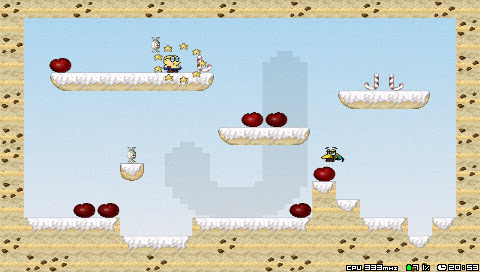
Nikwi Deluxe is a platformer game in which you are a boy collecting candy. You jump around grabbing candy avoiding the enemies. The enemies vary but for the most part don't let the birds poop on you.
This may be the first game that Deniska has ported that I don't like. Deniska entered this port into the NeoFlash Competition. The controls aren't very good. I would press the directional pad left or right and often the boy wouldn't move. This is a problem in later levels when there are numerous birds dropping poop on your head (what is that about?). The audio and graphics aren't bad but nothing special.
Basically the game isn't that much fun. I wish Deniska had found a solution to the memory problem in Metal Blob Solid. That game would have easily won the contest, imho.

Subscribe to:
Posts (Atom)


